Share your general availability
Set the days and hours you are typically available to work each week.
Your weekly availability tells SignGlasses which days and hours you can typically work. It is not for single appointments. Set it once and change it only when your usual week changes.
The operations team uses it when they offer jobs, and your job board leaves out assignments outside these hours. If you leave out weekends, no weekend jobs appear on your board. If you set 8 AM to 4 PM, no evening jobs appear.
Set your weekly availability
Until you save your hours, every day is checked and set from 12 AM to 12 AM, which counts as the whole day.
- Select View profile at the bottom left of your screen.
- Select the Availability tab.
- Under Weekly availability, uncheck each day you never work.
- For each day that stays checked, choose the hour you start and the hour you finish.
- Select Save weekly availability.
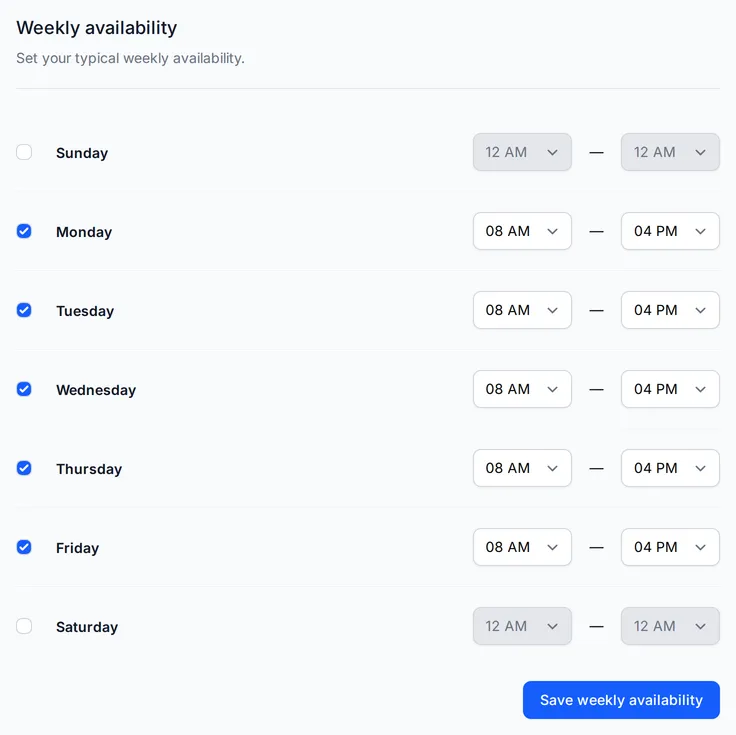
SignGlasses confirms that your availability is updated.
For example, if you are available on Sundays from 1 PM to 5 PM, choose those hours for Sunday. If you never work on Mondays, uncheck Monday. To work until midnight, choose 12 AM as the hour you finish.
Days that are different
For a day that does not follow your usual week, share your personal calendar so SignGlasses can see when you are busy. See Share your calendar availability.